By Michael Hilkemeijer
Many educators are told they need more ICT skills to succeed in today’s technology-driven classrooms. But what if developing more skills isn’t the real solution?
When Year 2 teacher Olivia joined the ICT in Education Teacher Academy, she expected another round of “how-to” tech tutorials. What she found instead was a complete mindset shift: it wasn’t more tools she needed—it was the confidence and capability to use those tools effectively. And that transformation made all the difference in her classroom.
In This Blog, You’ll Learn:
The difference between ICT skills and ICT capability
What ICT skills for primary students should be developed
Why teachers don’t need all the answers—just the right support
How the ICT in Education Teacher Academy teaches you how to integrate ICT in the classroom
Am I Just Learning Tools, or Learning to Teach with Them?
ICT skills for teachers typically include the ability to:
Use word processors to create and format documents
Build and design slide presentations
Operate spreadsheets for tracking or graphing
Navigate cloud platforms and online learning systems
Use interactive whiteboards and classroom tablets
Capture and edit multimedia for teaching purposes
Conduct effective online searches and resource curation
These are valuable—but they’re only the start. Knowing how to use a tool doesn’t always mean knowing how to teach with it, or how to guide students in applying it meaningfully.
Why Isn’t Knowing the Tool Enough Anymore?
ICT capability goes beyond technical know-how. It means teachers can:
🧠 Make pedagogically sound decisions about which ICT tools to use
🎯 Align technology use with learning goals and curriculum outcomes
🔁 Transfer digital processes across subjects and year levels
💬 Model decision-making, digital citizenship, and problem-solving
⚙️ Automate basic routines and focus on deeper learning
"Before joining the Academy, I could barely explain how to format a document—now I’m confidently teaching my students how to design full digital reports." — Olivia, Year 2 Teacher
How Can I Build Confidence in Teaching with ICT?
The Academy helps teachers move from basic ICT training to confident, curriculum-aligned ICT integration in the classroom.
🛤️ A Structured Framework for Growth
The membership follows the Technology Integrator’s Learning Journey to Transformation, inspired by the Technology Integration Matrix and aligned with the UNESCO ICT Competency Framework for Teachers.
This professional development journey guides teachers from:
📘 Digital literacy
📘 Intentional integration
📘 Creative classroom innovation
🧩 Practical ICT Workshops for Teachers
Workshops in the membership are built around practical application, not just tool demonstrations. You’ll learn:
How to embed technology into everyday teaching
How to plan for digital learning outcomes
How to differentiate and adapt ICT-rich activities for different learners
Topics include:
Literacy with ICT
Science and technology in primary classrooms
ICT in mathematics
Coding, creativity, and assessment
Each workshop also includes downloadable templates and PDF eBooks to support implementation.

🤝 What If I Need Help or Want to Learn From Others?
Inside the Academy’s private member community, teachers:
Ask questions and share ideas
Adapt ICT activities for different contexts
Reflect on what works and why
Support each other in growing their ICT capabilities
How Do I Actually Learn to Integrate ICT into My Teaching?
If you’re searching for how to integrate ICT in the classroom, or you’re wondering where to even start with how to incorporate ICT in the classroom—you’re not alone. For most teachers, ICT integration in teaching often feels like an expectation without a roadmap.
That’s where the ICT in Education Teacher Academy comes in.
This membership is designed entirely around showing teachers how to integrate ICT in teaching in ways that are practical, purposeful, and curriculum-aligned.
It’s not about throwing technology into lessons—it’s about embedding ICT meaningfully so that it enhances, supports, and deepens student learning.
Let’s break down exactly how the membership supports you to do this.
🎯 The Membership’s Core Purpose: ICT Integration in the Classroom
The Academy provides everything you need to confidently integrate ICT into your teaching practice, whether you’re just beginning or already experimenting with technology.
It supports:
How to use ICT in teaching that aligns with curriculum outcomes
How to integrate ICT in the classroom across literacy, numeracy, science, and more
How to incorporate ICT in the classroom in ways that enrich—not replace—your pedagogy
Developing both teacher ICT skills and the capability to guide students in doing the same
Whether you’re planning a coding activity, facilitating digital storytelling, or teaching students how to research online—you’ll know exactly how to do it, why to do it, and how to assess it.
🔎 What Makes This Membership Unique?
Unlike other PD programs, the ICT in Education Teacher Academy offers step-by-step support through:

📘 1. The Membership Workbook: Your Guide to Integration
💡 How Does the Workbook Actually Help You Integrate ICT in the Classroom?
If you’ve ever asked, “How do I go from just knowing a few tools to confidently integrating ICT into my teaching?” — this workbook is your answer.
The ICT in Education Teacher Academy workbook isn’t just a note-taking tool. It’s a structured, goal-focused professional development framework built specifically to help primary educators:
Plan technology-integrated lessons aligned with curriculum goals
Reflect on their practice to improve student outcomes
Develop ICT skills within the context of building ICT capability
Collect evidence for professional growth aligned to APST standards
Move confidently along the Technology Integrator’s Learning Journey to Transformation
🧠 From Skills to Capability: How the Workbook Builds Integration Confidence
The workbook supports ICT skill-building—but always in service of developing ICT capability. Here’s how:
✅ Self-Assessment Tools
You’ll begin by identifying your current ICT capability level with tools that assess:
Planning for ICT integration
Judging when and how ICT is beneficial
Adapting ICT use to student needs
Evaluating your students’ use of ICT
Teaching ICT techniques, routines, concepts, and higher order thinking
This assessment doesn’t just tell you where you are—it shows you where to go next, and which membership resources will get you there.
📘 What Will You Do with the Workbook?
🧭 1. Follow a Step-by-Step Success Path
You’ll move through four levels:
Adoption: Start applying tools to structured lessons
Adaptation: Use ICT with more flexibility and purpose
Infusion: Embed technology across your teaching
Transformation: Lead and innovate through ICT use
Each level comes with milestones, reflection prompts, and clear membership activities (e.g., download a lesson plan, use the Wisdom Tool, join a community discussion).
✍️ 2. Learn to Plan ICT-Integrated Lessons Confidently
With printable lesson templates tailored for primary educators, the workbook helps you:
Align ICT tools with learning goals
Plan extension activities and differentiated instruction
Reflect on ICT effectiveness using guided prompts
Adapt done-for-you lesson plans for your unique classroom context
You’ll also develop your TPACK knowledge with templates focused on Technological Knowledge (TK), Pedagogical Knowledge (TPK), and TPACK—bridging the gap between “using tech” and “teaching with tech.”
🎯 3. Document and Reflect to Improve Your Practice
Every section of the workbook includes:
Critical reflection questions
Outcome comparison tables (before vs. after using ICT)
A challenges log to track implementation efforts
A Professional Development Tracker linked to APST standards
Templates for mentoring, collaboration, and leadership growth
These tools help you see how your skills are developing and how ICT is transforming your classroom practice.
📚 4. Use the Workbook to Teach ICT Skills in Context
Through lesson planning, classroom trials, and community feedback, the workbook helps you:
Model ICT skills in context (not in isolation)
Teach students how to use ICT tools to create, collaborate, and problem-solve
Plan for student ICT capability—so students aren’t just clicking through tasks but using digital tools to express, investigate, and extend their learning
The workbook even includes differentiation strategies and planning for:
Word processing and document creation
Spreadsheets and data analysis
Graphics, animation, and coding
Presentation software
Digital citizenship and online safety
🔄 Why This Workbook Helps You Go Beyond Skills
Unlike checklists or one-off PD sessions, the workbook supports:
Ongoing, embedded learning
Planning with real curriculum goals in mind
Skill development through reflection, practice, and community
APST-aligned professional growth, with templates to collect your evidence
📘 It’s not about learning more tools. It’s about learning how to teach with them—with confidence, purpose, and strategy.
🎥 2. Workshops That Teach You How to Use ICT in the Classroom
The membership includes Primary Workshops that directly show you how to integrate ICT in teaching, from foundational topics to more advanced instructional design.
These include:
Literacy with ICT Instructional Courses (Early Primary to Year 5)
Science and Technology in the Primary Classroom
ICT in the Mathematics Curriculum
Digital Pedagogy Workshops for cross-curricular ICT integration
Each workshop:
Focuses on how to use ICT in the classroom for real learning—not novelty
Breaks down specific strategies with classroom examples
Links to downloadable eBooks and PDF guides to help you immediately apply what you learn
Whether you’re a beginner learning how to incorporate ICT in the classroom for the first time, or you’re refining how to use interactive whiteboards and spreadsheets meaningfully, these workshops will move you from uncertainty to clarity.

🎙️ 3. What Can I Learn From Other Teachers Doing This Already?
Inside the Members’ Library, the Primary Experts Playlist features recorded presentations from teachers, school leaders, and digital learning specialists.
Here, you’ll see:
Real-world examples of integrating ICT in the classroom from early years to upper primary
Insight into tools, strategies, and reflections from educators just like you
Innovative approaches to coding, multimedia learning, and digital assessment
These expert insights help you go beyond the “what” of ICT use and really understand “how” and “why” to integrate ICT into everyday classroom teaching.
💬 4. What If I Have a Specific Integration Question?
Integration isn’t one-size-fits-all—and the Wisdom Tool makes sure your questions are answered in context.
You might ask:
"How can I integrate ICT in a Year 3 science unit on weather?"
"How can I scaffold presentation software use for my Year 4s?"
In return, you’ll get:
Curated workshop snippets
Peer-suggested lesson plans
Planning templates with ICT integration outcomes
Member reflections and guidance
It’s like having an ICT mentor in your back pocket—available any time you need help integrating ICT in your classroom practice.

🔁 Connecting Integration to Teacher & Student ICT Skill Development
Here’s where it all comes together.
When teachers understand how to integrate ICT in teaching, they also:
Become more confident in their own ICT skills for teachers
Are better equipped to scaffold student ICT skills
Can move students toward demonstrating ICT capability, not just task completion
The membership doesn’t just show you how to use a word processor—it shows you when and why to use it, how to model it through shared writing, and how to assess whether students can apply the skill independently.
In turn, students develop:
Skills in word processing, spreadsheets, presentations, coding, animation, and digital citizenship
The capability to choose tools, solve problems, and express their learning using ICT
A mindset of responsible, critical, and creative ICT use
This is real ICT integration in the classroom—not just knowing how to click the right buttons.
In Summary: How to Integrate ICT in the Classroom with Confidence
Becoming a member of the ICT in Education Teacher Academy gives you:
A roadmap for how to integrate ICT in teaching
Curriculum-aligned workshops for planning, differentiation, and assessment
A workbook to support daily ICT integration
Peer guidance and expert insight to refine your practice
Tools that help you teach and model ICT skills—while developing your own capability
You’re not learning ICT for the sake of it. You’re learning how to:
✅ Integrate ICT purposefully
✅ Plan with confidence
✅ Support your students’ digital development
✅ Lead learning in the 21st-century classroom
👉 If you're ready to move from scattered ICT activities to confident integration across your teaching practice, then the ICT in Education Teacher Academy is your next step.
Want to Move Beyond ICT Skills?
If you're looking to move past surface-level tools and learn how to integrate ICT in teaching in ways that actually work, the ICT in Education Teacher Academy gives you everything you need:
✔️ Expert-led workshops
✔️ Practical planning and observation templates
✔️ Reflective tools and community discussion
✔️ Real answers to your everyday ICT questions
How Building Teacher Capability Builds Student ICT Skills
One of the biggest impacts of the membership is the flow-on effect from teacher learning to student learning. When teachers develop ICT capability, they can:
🧑🏫 Plan the right learning activity for the right tool
💡 Demonstrate and scaffold new skills in real time
🧩 Intervene and support when students need help
🔄 Link digital tasks to meaningful learning outcomes
Olivia shared how her students went from inserting pictures into Word documents to producing entire digital narratives with page formatting, voiceovers, and structured layouts—all because she felt confident guiding them step-by-step.
ICT Skills for Primary Students: What Teachers Need to Know and Teach
The ICT in Education Teacher Academy helps teachers foster the following key ICT skills for students through authentic learning tasks:
💻 1. Word Processing Skills
Create and format documents
Insert and resize images
Apply layout elements (headers, footers, page numbers)
Use SmartArt, tables, templates, and hyperlinks
📊 2. Spreadsheet Skills
Record and sort data
Use basic formulas
Create charts and graphs
Understand table structures and formatting
🎨 3. Graphics and Animation Skills
Design digital artwork
Create simple animations and storyboards
Use visual communication to express ideas
🔍 4. Advanced Web Searching Skills
Conduct purposeful research
Evaluate sources
Apply digital literacy principles and safety
🖼️ 5. Presentation Software Skills
Create slides using templates and layouts
Insert multimedia (images, audio, video)
Use animations to enhance—not distract from—presentations
💻 6. Coding and Computational Thinking
Write simple code
Use programmable robots
Understand sequencing, algorithms, and logic
🌐 7. Digital Literacy Skills
Understand online safety
Practice ethical technology use
Build responsible digital citizenship
How the Membership Helps Teachers Develop These Skills in Students
The Academy supports teachers to:
Integrate ICT skills into everyday lessons
Model ICT use clearly and meaningfully
Scaffold student learning using developmental stages
Align ICT tasks with EYLF and primary curriculum outcomes
Build both student ICT skills and ICT capabilities
In one term, Olivia’s Year 2 students moved from copying images into a document to independently producing illustrated, captioned digital stories. This wasn’t just the result of skills—it was the result of her ICT capability, developed through the Academy.
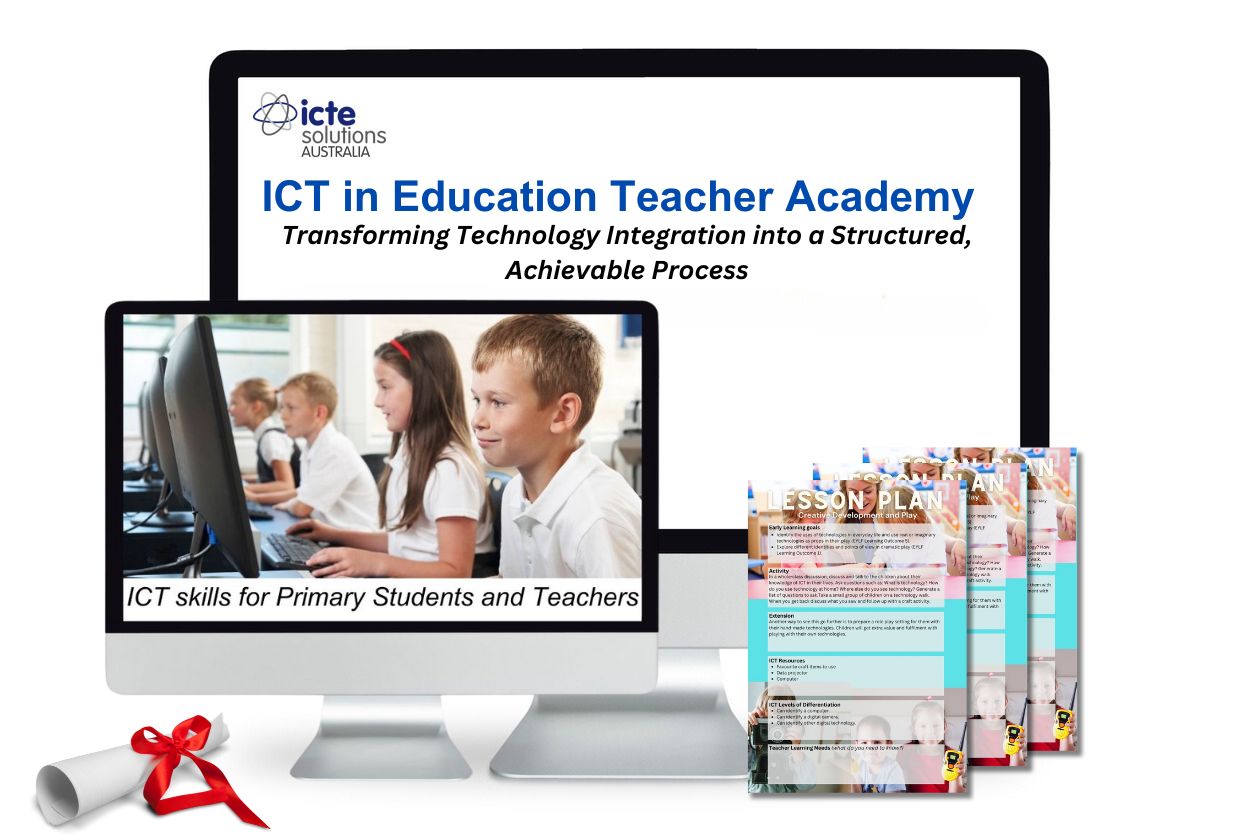
What ICT Skills Do Teachers Really Need?
So, what ICT skills do teachers need?
They need more than a checklist of technical tasks.
Teachers need:
✅ A working knowledge of common classroom tools (e.g., word processors, presentation software, spreadsheets)
✅ The ability to model and teach these tools meaningfully
✅ The skill to plan, scaffold, and assess ICT-based learning
✅ The confidence to adapt, troubleshoot, and reflect
✅ The capability to make informed, intentional decisions about technology use in context
But most importantly—they need to develop their ICT capability, because it’s this foundation that allows ICT skills to be used effectively, flexibly, and purposefully in the classroom.
The ICT in Education Teacher Academy delivers technology professional development for teachers that helps you achieve this by offering:
A structured professional learning pathway
Practical workshops and classroom-tested lesson plans
A supportive teacher community
Reflective tools that align with curriculum outcomes
Real-time help with planning, differentiation, and implementation
📘 When you build your ICT capability, you don’t just gain skills—you gain the power to transform your teaching.
Are you ready to move beyond tech tips and build the capability to confidently lead digital learning in your classroom?